

Tag and Vendor Speed Audit
Alternative to GTM audit, website vendor audit, page speed audit
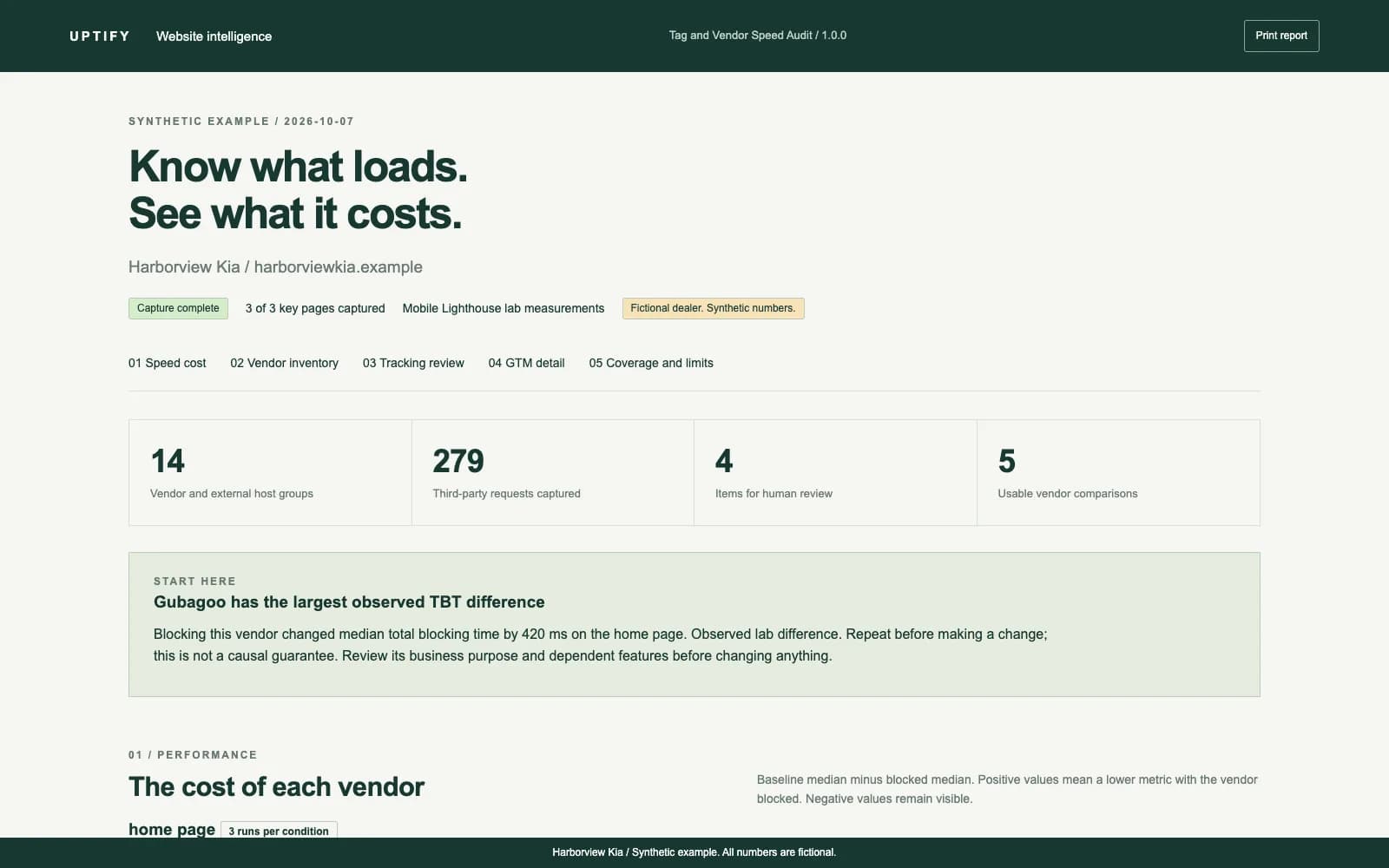
See which vendors load on your dealer website, review tracking issues and compare their mobile speed cost.
TL;DR
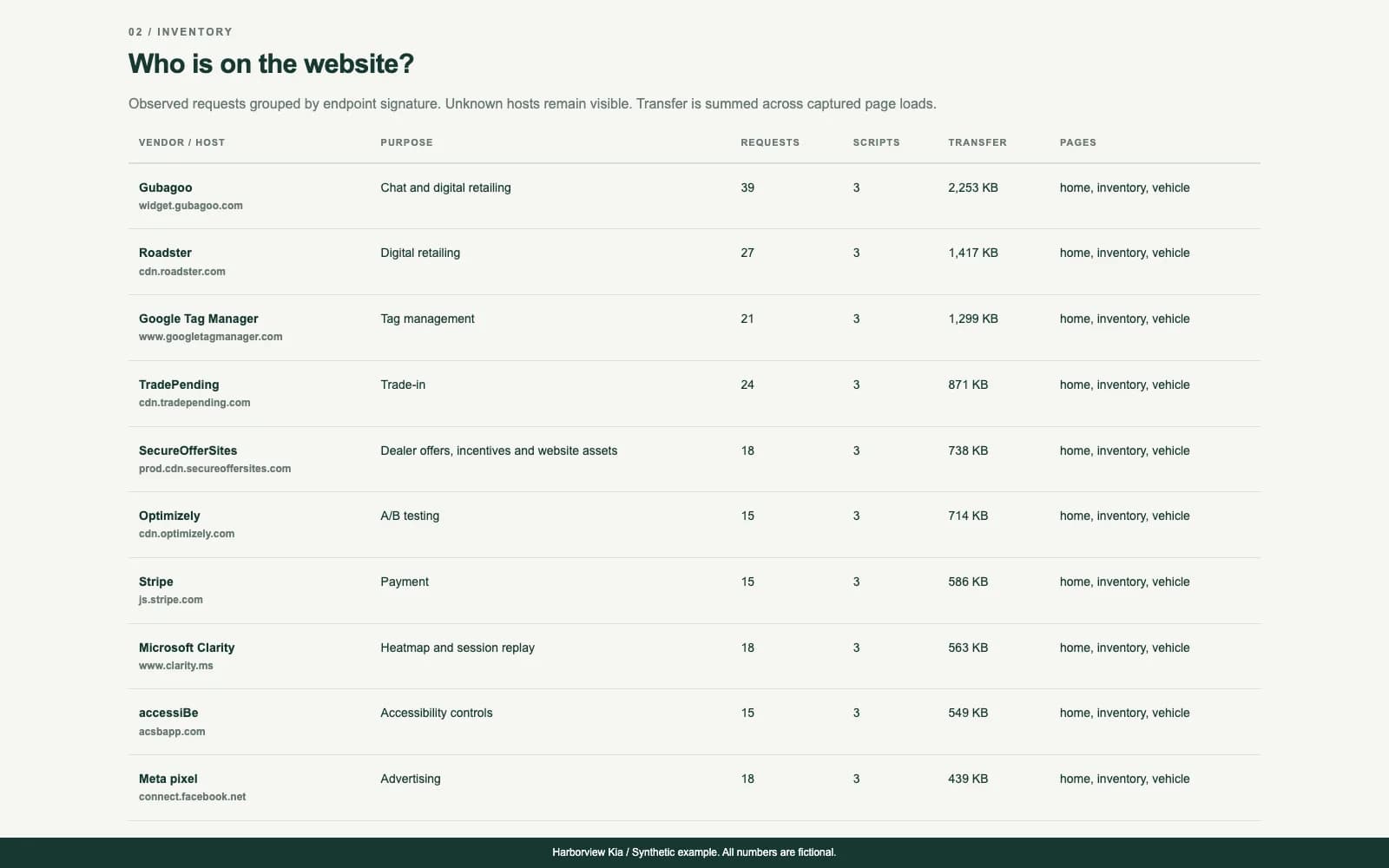
- Inventory observed vendors, scripts and requests across three key page types
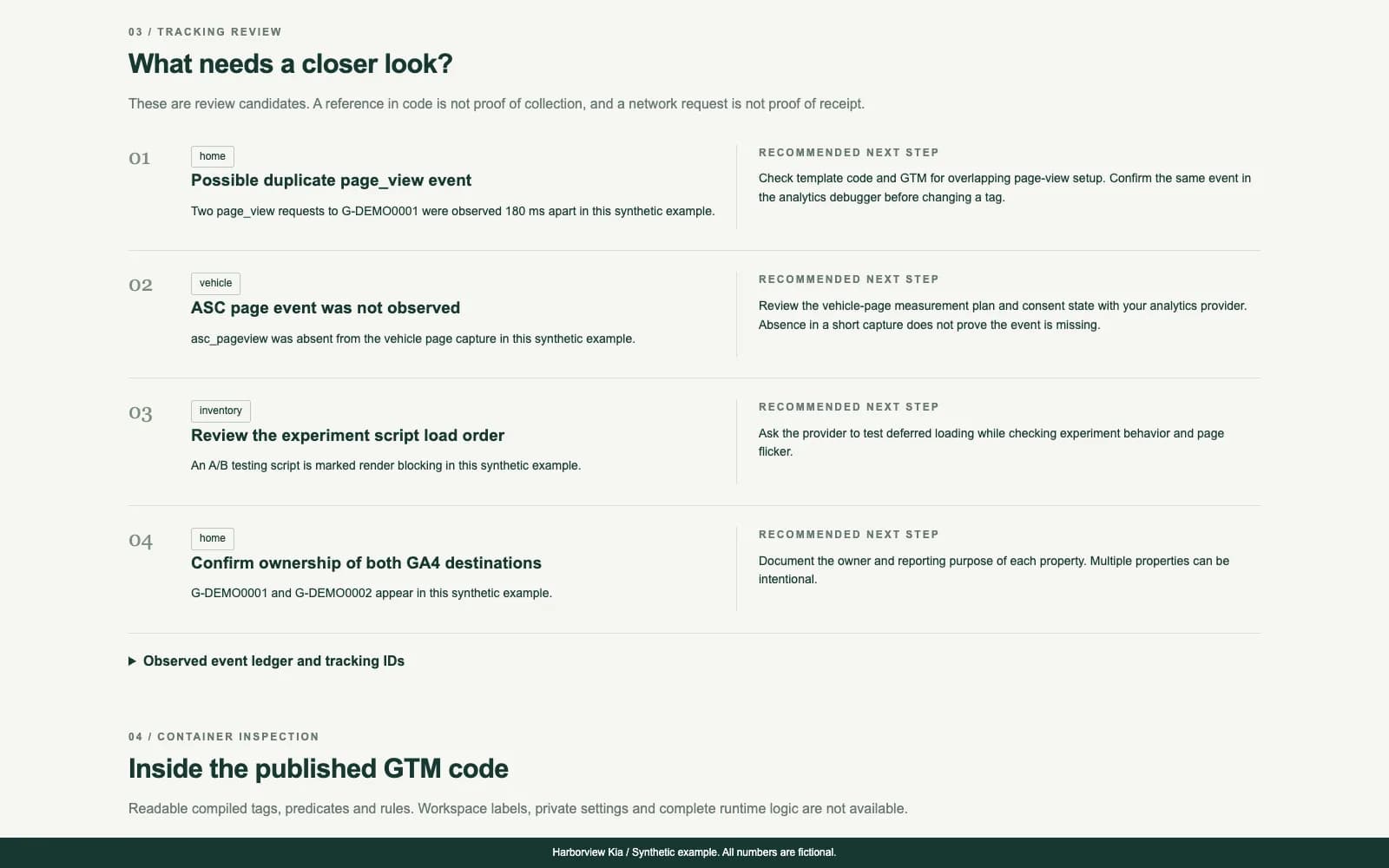
- Review GTM, GA4, advertising pixels and possible duplicate tracking
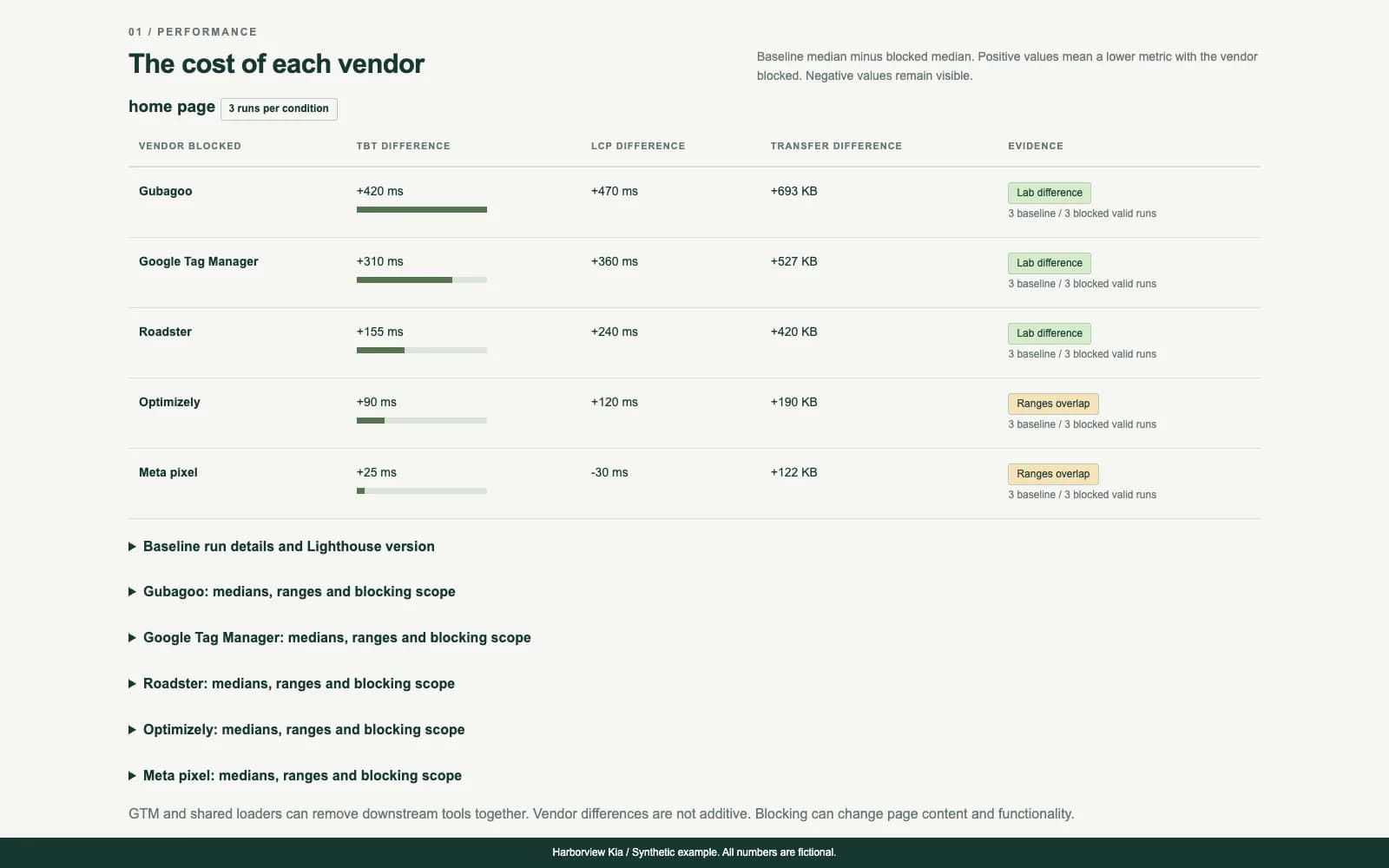
- Compare repeated mobile Lighthouse results with vendors blocked
- Share a printable HTML report, JSON evidence and CSV exports
- Pay $149 once for one dealer website. Agent access is optional and separate
Quick facts
- Alternative to
- GTM audit, website vendor audit, page speed audit
- Works with
- Claude Code, OpenAI Codex, Google Tag Manager, Google Analytics 4, Any dealer website
- Best for
- Dealer marketing managers preparing a tag and vendor review, Agencies reviewing the licensed dealer's tracking implementation, Dealer groups that need a repeatable audit process, with a license for each website
- Delivery
- Source code download
A dealer website can load analytics, chat, trade-in tools, advertising pixels and other scripts from many providers. This audit puts the observed requests in one report so you can see what is running and who needs to review it.
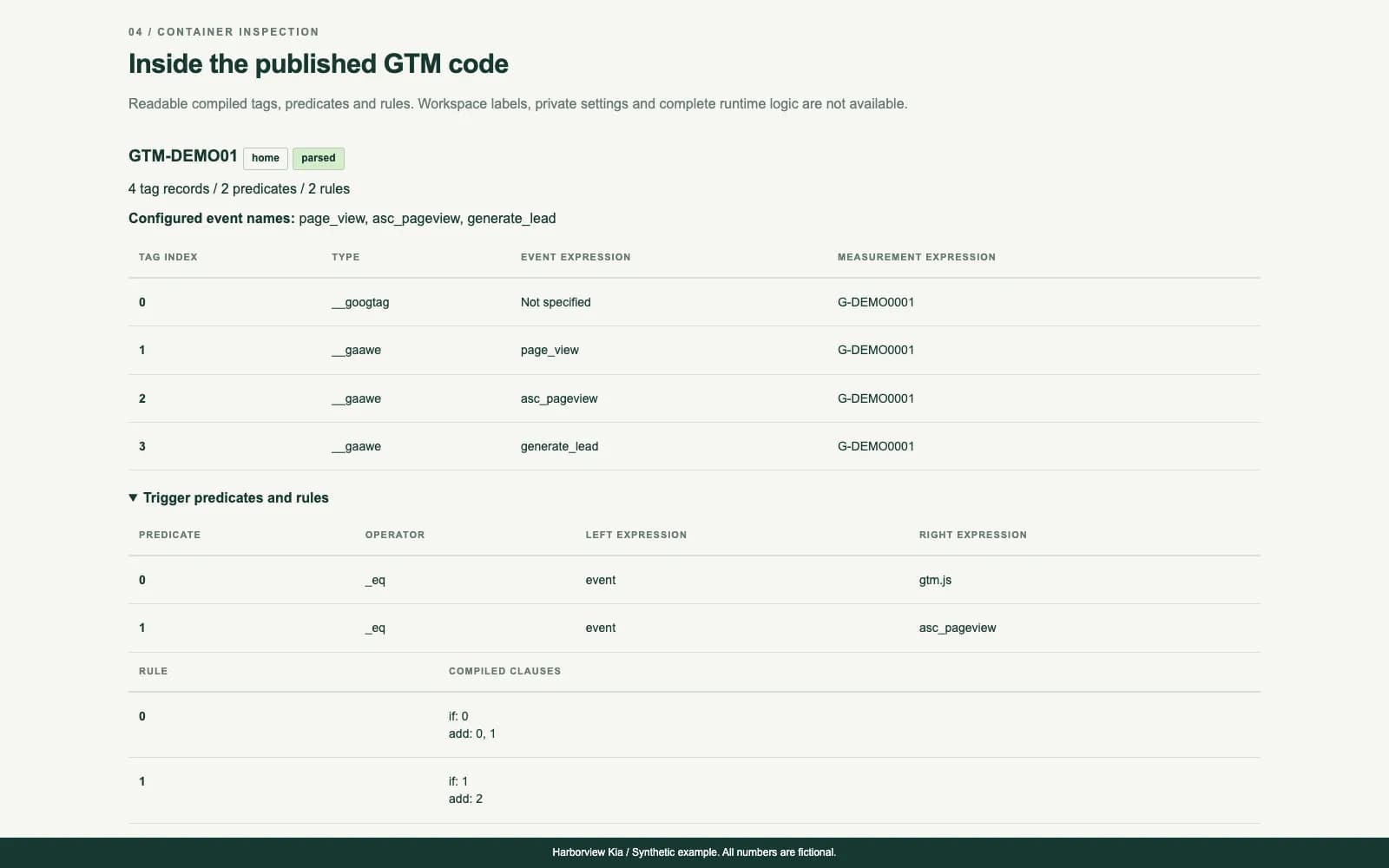
Enter your website URL. The tool samples the homepage, an inventory search page and a vehicle detail page. It lists vendor requests, reads available published GTM tags and trigger expressions, and flags possible duplicate tracking, legacy analytics and events that were not observed.
Repeated mobile Lighthouse runs compare a baseline with selected vendors blocked. The report shows median differences in total blocking time, largest contentful paint and transfer size, plus ranges and incomplete measurements. Use these findings to plan a controlled review with your website and analytics providers.
$149 one-time for one dealer website. Includes a local CLI, Claude Code skill and Codex instructions. No product subscription or API key is required. Lab results vary, and blocking can affect page content. The audit does not certify tracking accuracy or guarantee faster pages.
What it does
- Vendor signatures for analytics, ads, chat, trade-in, payment, reviews, heatmaps, A/B testing and digital retailing
- Unknown third-party hosts remain visible for manual review
- Published GTM inspection for readable tags, macros, predicate expressions and rules
- Tracking ID inventory and selected outgoing event observation
- Review candidates for repeat container loads, repeat events, old Universal Analytics and missing observed vehicle-page events
- Render-blocking script evidence from the browser where available
- Three or more mobile Lighthouse runs per condition, with medians, ranges and negative differences retained
- Vendor blocking patterns and baseline-presence checks, with inconclusive comparisons labeled
- Printable reports and spreadsheet-ready exports that stay on your computer
What you get
- Node.js CLI and editable product source
- Claude Code skill and root Codex AGENTS.md instructions
- HTML report generator and JSON and CSV exporters
- Vendor signature table and measurement-method guide
- Single dealer website license and setup instructions
How you get started
Buy once. Enter one dealer at checkout for setup help.
- 1
Download the zip
YouAt signupFind it in Purchases right after checkout.
- 2
Install
YouAt signupUnzip, then run npm ci in the folder.
- 3
Run your first audit
YouAt signupOpen Claude Code or Codex in the folder and ask it to audit your website.
Setup
What you need
- Node.js 20 or newer, including npm
- Google Chrome, or the Chromium browser installed through Playwright
- Internet access and a public dealer website URL
- A computer capable of running Chrome on Windows, macOS or Linux. Linux may require browser system libraries
- Optional Claude Code or OpenAI Codex account. Usage charges are separate
Steps
- 1Unzip the product
- 2Install dependencies
- 3Run your audit
- 4Review the evidence
Follow the setup guide in your account after purchase.
How it connects
Connection and access details provided by the publisher.
| System | Connection | What that means |
|---|---|---|
| Dealer websites | Public website Loads your public pages in a browser and runs Lighthouse. No GTM, analytics or website login. | Loads your public pages in a browser and runs Lighthouse. No GTM, analytics or website login. |
Security review
The publisher has not provided a security review.
Dealer reviews
Write a reviewOnly dealers that piloted or bought this tool can review it.
No reviews yet. Finish a pilot or buy this tool to leave a dealer review.
Questions
The builder answers pre-sale questions in public.
No questions yet.
Ask a public questionCommon questions
Chrome was not found. What should I do?
Run npm run browser:install, or set CHROME_PATH to your installed Chrome executable. On Linux, check that the browser's system libraries are installed.
My inventory or vehicle page was missed. Can I supply it?
Yes. Rerun with --inventory and --vehicle followed by the exact public URLs on the same dealer host. Some sites use embedded inventory that cannot be discovered automatically.
Why does the report say partial or inconclusive?
A page may be blocked, a navigation may fail, or a vendor may not appear consistently across baseline runs. Read the coverage and run details. Incomplete evidence does not establish that tracking is missing.
Why is a vendor difference negative?
The blocked median was higher than the baseline median. Lab variation and changed page behavior can produce this result. Review the ranges and repeat the comparison before drawing conclusions.
Can this prove that my conversions are tracked correctly?
No. It observes selected browser events and readable published configuration. It does not verify server-side receipt, attribution, consent compliance or every conversion journey.
Can one purchase cover my agency or dealer group?
One purchase covers one dealer website. Your employees and contractors may run it for that website. Each additional website needs its own license.
Changelog
1.0.0
Initial release with sitemap and provider-path page discovery, browser verification of inventory and vehicle pages, expanded dealer vendor signatures, compiled GTM inspection, tracking review candidates, repeated mobile Lighthouse comparisons, HTML reports and JSON and CSV exports.
Tag and Vendor Speed Audit
$149one-time