

Dealer Group Marketing Budget Planner
Alternative to marketing budget spreadsheet, dealer marketing budget template, co-op tracker
Plan monthly marketing spend by store and vendor, compare actual results, and model a budget shift in one workbook.
TL;DR
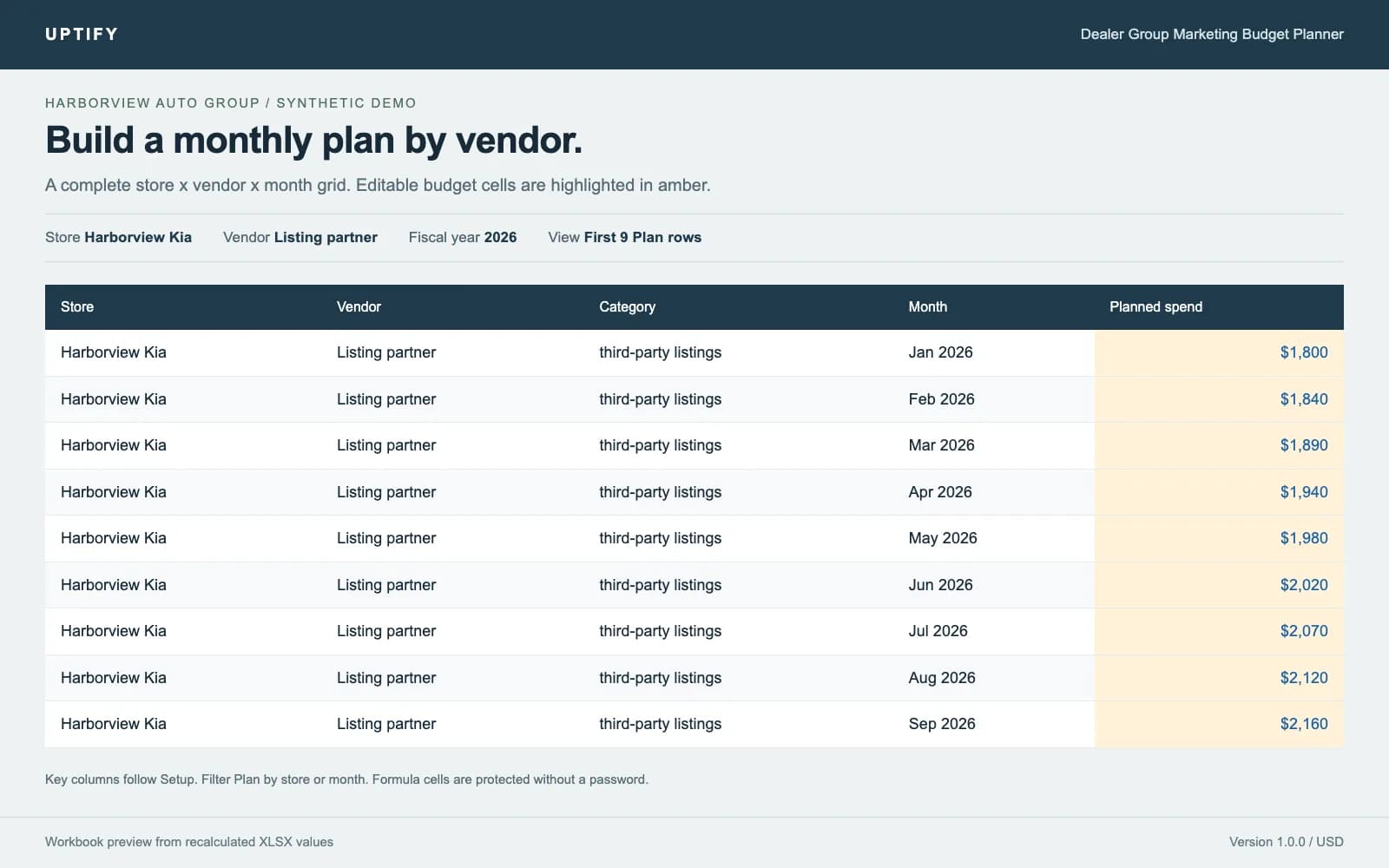
- Monthly budgets by store, vendor and category
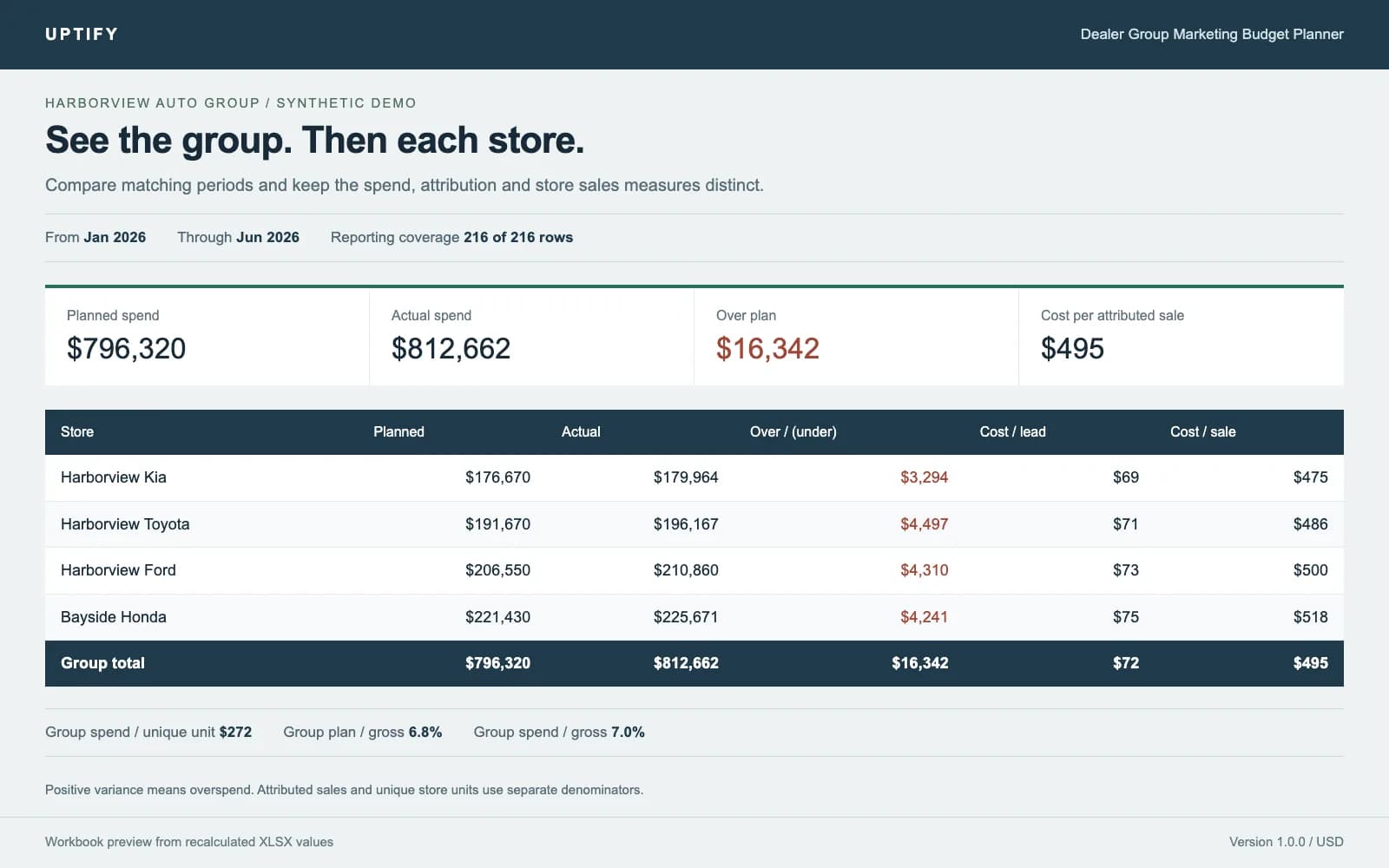
- Group and store rollups with clear variance and efficiency measures
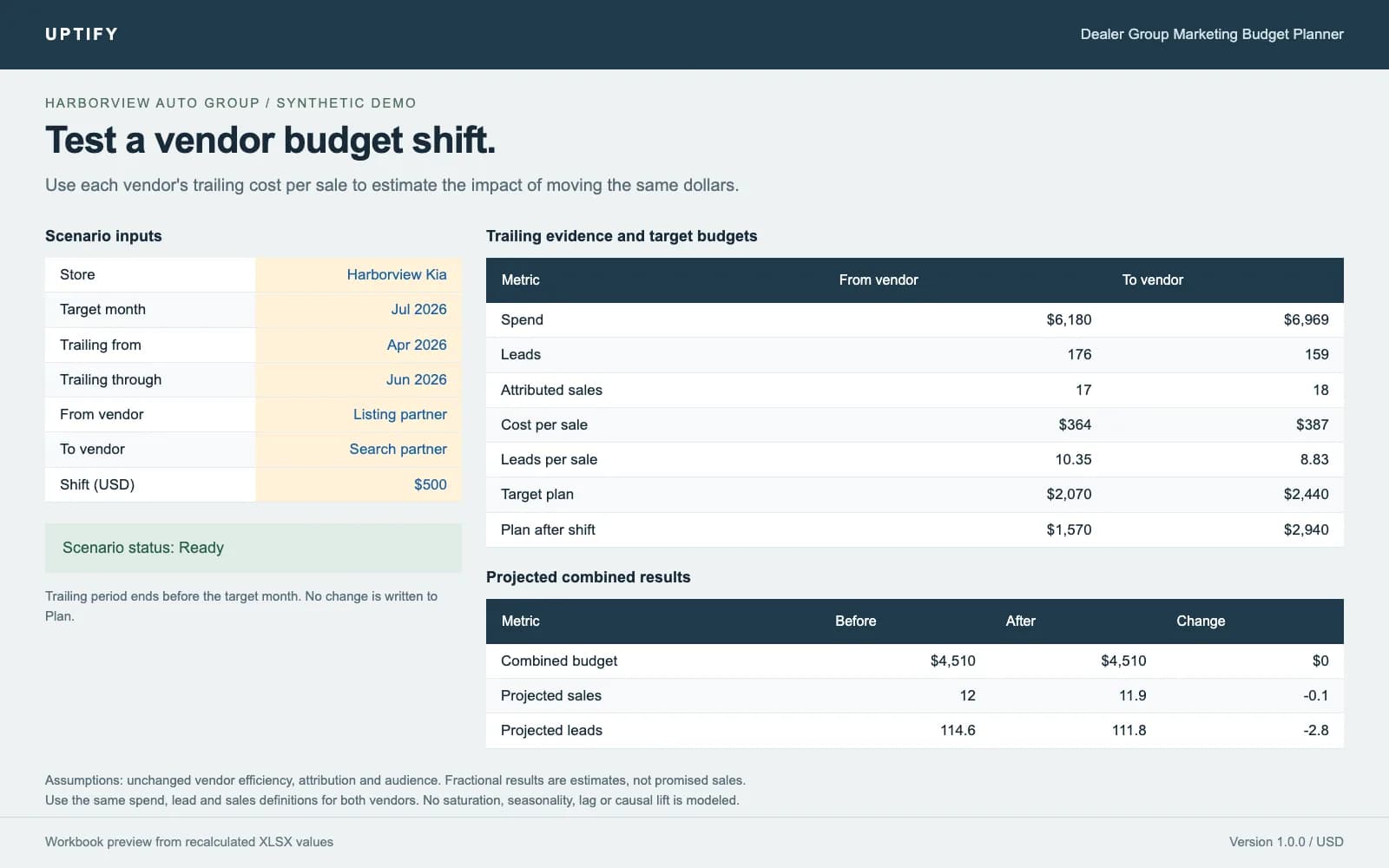
- Co-op estimates and a vendor budget shift model
- Example and blank Excel workbooks with optional local import tools
- $149 once for one dealer group, including any number of its stores
Quick facts
- Alternative to
- marketing budget spreadsheet, dealer marketing budget template, co-op tracker
- Works with
- Microsoft Excel, Google Sheets, Claude Code, OpenAI Codex
- Best for
- Dealer group marketing directors preparing monthly spend reviews, GMs comparing planned spend with store results, Agencies managing budgets for the licensed dealer group
- Delivery
- Source code download
Bring store plans and monthly vendor results into a shared budget review. This downloadable Excel workbook rolls up planned spend, actual spend and variance for the group and each store. It also calculates cost per lead, cost per attributed sale, spend per unique unit sold, and budget as a percent of gross profit when gross is entered.
Set up stores and vendors, enter budgets, and paste monthly actuals. Estimate co-op reimbursement with your own shares, rates and caps. Use What-if to move dollars between two vendors and compare projected leads and sales using their trailing efficiency. Projections assume that efficiency continues. They do not establish causal lift or promise results.
The $149 one-time purchase includes a synthetic Harborview Auto Group example, a blank workbook, a reproducible generator, a validated CSV importer, and instructions for Claude Code and OpenAI Codex. One license covers one dealer group and any number of its stores. The included files have four stores and nine vendors; the generator can create a different size. Standard formulas were recalculated with LibreOffice. Native Google Sheets import and Excel desktop behavior were not directly tested.
What it does
- Twelve-month fiscal calendar with configurable store, brand and vendor lists
- Plan grid and paste-friendly monthly Actuals inputs
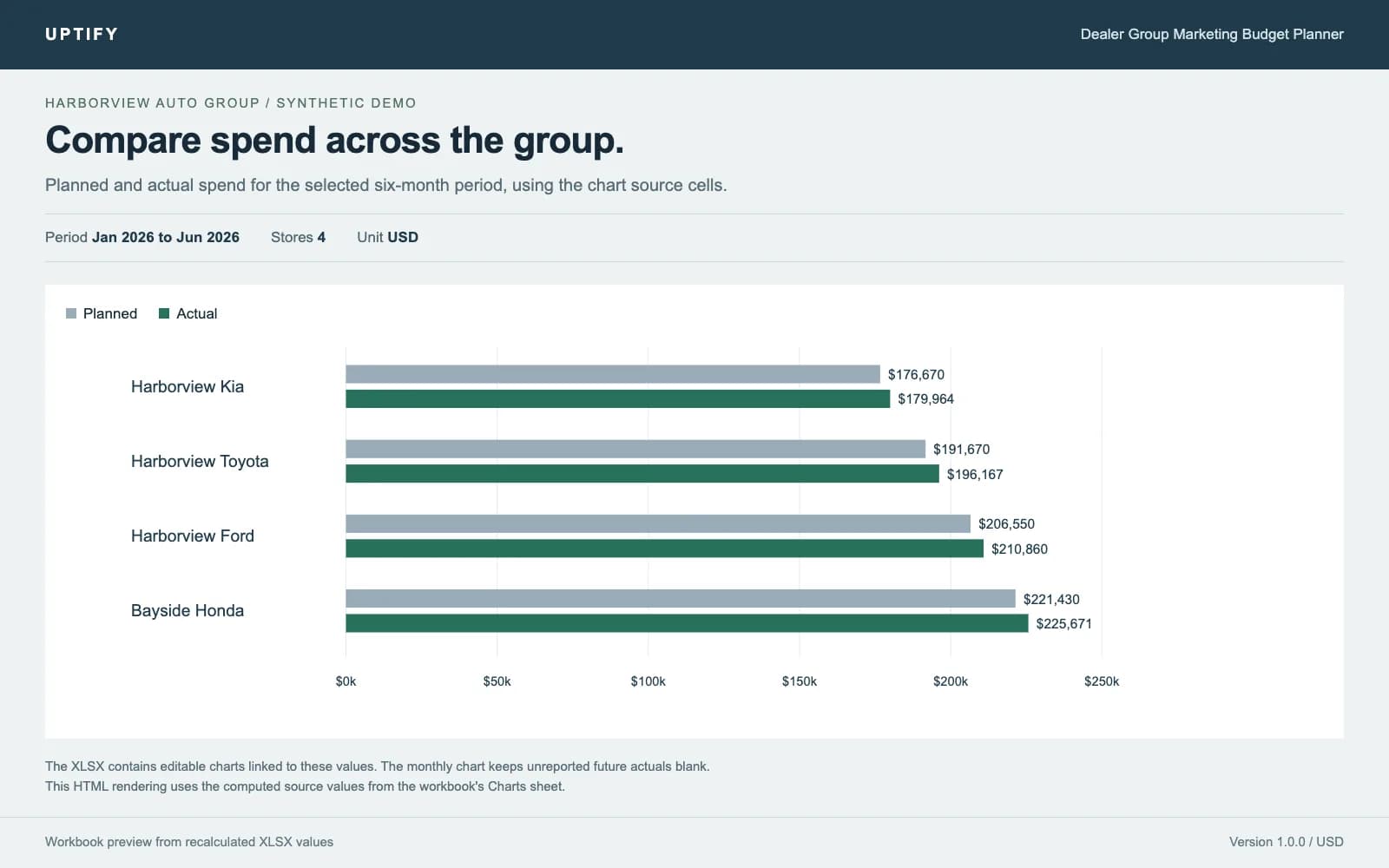
- Matching-period planned versus actual totals and overspend formatting
- Separate attributed sales and unique store units to keep cost measures distinct
- Gross profit ratios that require complete selected-period gross inputs
- Co-op eligible spend, expected reimbursement and optional row caps
- What-if comparison using trailing cost per sale and leads per sale
- Editable charts, dropdowns, frozen headers, print settings and protected formula cells
- CSV validation, duplicate checks, new-file imports and input-based variance reports
What you get
- Synthetic example and blank .xlsx workbooks
- Python workbook generator and example group configuration
- CSV importer, workbook reader and synthetic example export
- Optional LibreOffice recalculation script and zip builder
- Claude Code skill, Codex AGENTS.md, setup guide and formula definitions
- Single dealer group license and release verification notes
How you get started
Buy once. Enter one dealer at checkout for setup help.
- 1
Download the zip
YouAt signupFind it in Purchases right after checkout.
- 2
Open the workbook
YouAt signupOpen the blank workbook in Excel or import it into Google Sheets.
- 3
Set up your group
YouAt signupFill in Setup, then build your plan.
Setup
What you need
- Excel with XLSX and SUMIFS support, or Google Sheets for importing the file
- Monthly aggregate spend, leads and attributed sales with consistent store and vendor names
- Unique monthly store units sold, plus gross profit if you want gross-based ratios
- Python 3.10+ and openpyxl for the optional generator, importer and reader
- LibreOffice for optional headless recalculation. Node.js 20+ only for rebuilding the zip
- Your own Claude Code or OpenAI Codex access if using an agent. Neither is required to edit the workbook
Steps
- 1Open the example
- 2Configure a working copy
- 3Enter the plan and actuals
- 4Review the same period
- 5Compare a shift
Follow the setup guide in your account after purchase.
How it connects
Connection and access details provided by the publisher.
| System | Connection | What that means |
|---|---|---|
| Your spend and lead exports | Your own export You paste or import your own exports. No connections. | You paste or import your own exports. No connections. |
Security review
The publisher has not provided a security review.
Dealer reviews
Write a reviewOnly dealers that piloted or bought this tool can review it.
No reviews yet. Finish a pilot or buy this tool to leave a dealer review.
Questions
The builder answers pre-sale questions in public.
No questions yet.
Ask a public questionCommon questions
Why does a ratio show n.a.?
Its denominator is zero or required store-month units or gross are missing. Enter complete values for the selected period. Known zero and missing are different.
Why was my CSV rejected?
Use the exact six-column header in the example, month-start dates, Setup names, complete nonnegative numeric fields and unique monthly keys. Counts must be whole numbers.
Can I correct an imported month?
Yes. Use a reviewed correction file and --mode replace-key with a new output path. Matching records are replaced. Unmentioned records are preserved.
Why is the What-if result unavailable?
Check the scenario status. It needs two vendors, complete trailing monthly history with positive totals, a trailing end before the target month, and a shift within the source budget.
Can I use Google Sheets?
The workbook uses common formulas and can be imported as XLSX. Check the example totals after import and reapply range protection. Native import, chart formatting and protection behavior were not directly tested for this release.
Why are calculated cells empty after a script import?
The importer preserves formulas but does not calculate them. Open in Excel or Sheets, or run the included LibreOffice recalculation command. The reader can still calculate its report from input cells.
Changelog
1.0.0
Initial release. Includes example and blank workbooks, nine sheets, native charts, co-op estimates, vendor shift modeling, reproducible generation, validated CSV import and shared agent instructions.
Dealer Group Marketing Budget Planner
$149one-time